

July 2026's Steam chart is a shopping list — Palworld 1.0, Schedule I, Clair Obscur: Expedition 33, GTA V Enhanced, and remaster launches all compete for the same wallet. If you earn on GPT platforms, you do not have to pick between "play later" and "risky gray-market keys." This guide maps real price bands, earning targets on CashVers, when in-platform store spend beats crypto cashout, and a weekend plan to fund one chart hit without touching your credit card.
"Chart heat is a terrible reason to buy scam keys — it is a great reason to run a disciplined earn-to-store loop you can repeat every sale season."
We already covered individual titles in depth — see Palworld 1.0 charts, Schedule I charts, and Expedition 33 charts. Here the focus is money math: how much to earn, how long it takes, and where friction hides.
Which July 2026 Steam chart games should earners target first?
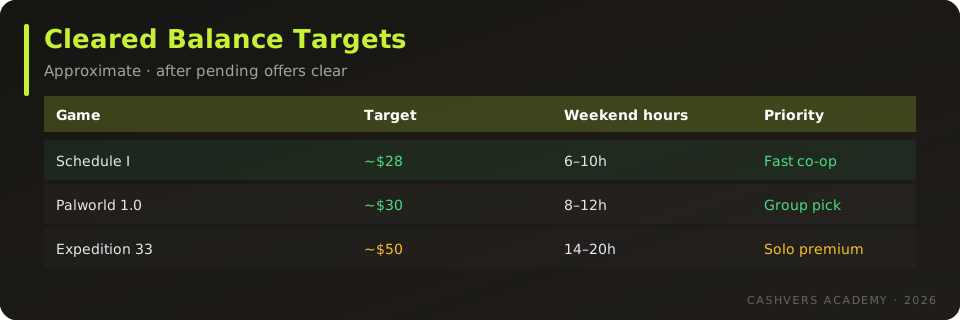
Pick one title that matches your playtime reality — co-op sandboxes reward groups; Expedition 33 rewards solo calendar blocks — then earn the exact MSRP band before browsing unrelated offers. Impulse buying three chart games on credit while earning slowly is how key scams win. One verified purchase builds trust in the loop; stack more titles next month.
| Title | Typical spend band | Best for | Earn difficulty |
|---|---|---|---|
| Palworld 1.0 | ~$30 | Co-op months | Moderate |
| Schedule I | ~$25–28 | Weekly co-op nights | Moderate |
| Expedition 33 | ~$45–50 | Solo RPG finish | Higher |
| GTA V Enhanced | ~$20–40 (bundle dependent) | Online crews | Varies |
| Halo pre-order | ~$50–70 | Franchise fans | Long runway |
CashVers Store
Turn balance into a chart game tonight
After offers credit, checkout Steam keys in one cart — no external seller roulette.
What is the CashVers earn → store loop?
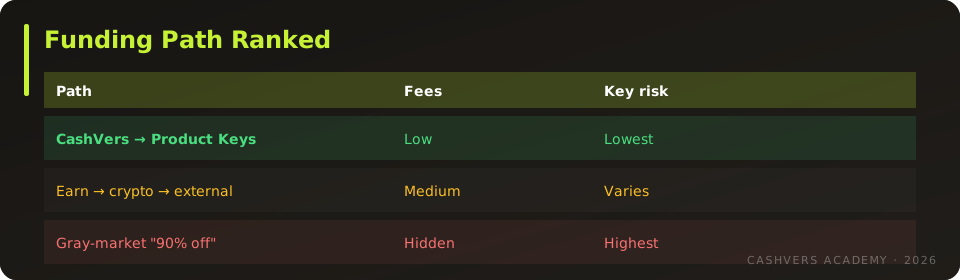
Sign up, complete verified offers, wait for balance to clear fraud checks, then spend in the Product Keys catalog on Steam CD keys — same account, no re-entering card numbers on unknown sites. The loop is slower than a Steam sale impulse click and faster than saving discretionary cash if you already GPT casually.
- Run first payout in 24 hours checklist — email verify, profile complete, one low-friction offer.
- Track cleared vs pending balance; only budget cleared funds toward keys.
- Search catalog for CD keys (not account shares) matching your Steam region.
- Redeem immediately; archive order confirmation.
Deep dive: Turn CashVers earnings into Steam keys.
How many offer hours fund a $30 chart game?
Plan 6–12 hours of mixed surveys, app installs, and game trials across one or two weekends for a ~$30 target — faster if you qualify for high-payout game offers, slower if you skip profile matching. This is not a job wage; it is side income with variance. Track hourly effective rate after rejections. If an offer pays $0.20 for 15 minutes, skip it when a $3 game install exists and your device qualifies.
Expedition 33's ~$50 band doubles the runway — earn for Palworld or Schedule I first if you are new. Veterans stacking multiple July purchases should sequence cheapest co-op title → RPG → pre-order.
When does store spend beat crypto cashout?
In-platform keys win when crypto network fees and minimum withdrawals would eat more than ~$3 of a sub-$40 purchase — common for new earners cashing out once. Read crypto vs store credit before choosing BTC/USDT. Store credit also avoids sending bank-linked withdrawals through extra hops just to buy Steam keys externally.
Cash out when an authorized external sale saves more than fees + time — typically high-ticket bundles you cannot find in-catalog, not a single $27 Schedule I key.
CashVers vs other GPT sites for game funding
Integrated Product Keys matter more than headline CPM when your goal is a library, not PayPal flexing. Platforms without vetted game checkout push you toward gray markets by default. Compare payout friction in CashVers vs Freecash and site quality in best GPT sites 2026 — then pick one primary earn home to avoid scattered sub-minimum balances.
Region locks — the silent budget killer
July chart hype increases sloppy key purchases: EU keys on US accounts fail at redeem and burn earned balance emotionally even when refunds exist. Always open the product page region tag. ROW/global labels still require reading fine print. Our key safety guide applies to in-platform checkout too — catalog listings are vetted, but region matching remains your job.
Sample weekend plan: fund Schedule I
Saturday: profile tune-up + two surveys + one game install; Sunday: repeat + verify balance cleared; Monday evening: buy Schedule I CD key and redeem before co-op night. Substitute Palworld if your group already owns Schedule I. Document effective hourly rate — if you fall below minimum wage equivalent and do not enjoy offers, fund one game then switch to paid work + authorized Steam sales instead of grinding indefinitely.
Mistakes that waste July chart enthusiasm
- Buying account-share keys because earn time felt long — ban risk zeroes savings.
- Cashing out $8 crypto to buy a $25 external key after $4 fees.
- Splitting earnings across five GPT sites under each withdrawal minimum.
- Funding Halo pre-orders before finishing one game you already own.
- Skipping KYC then rage-quitting when cashout triggers verification.
Which offer types pay best toward chart games?
Game install offers with retention checkpoints often beat endless survey screener rejects when your device qualifies — but read terms before uninstalling. Mix low-friction surveys for steady cents with one high-payout game trial per weekend. Avoid offers that require deposits, gambling, or subscription traps unless you already wanted the product.
Track effective hourly rate in a notes app. If you fall below your personal floor twice in a row, switch offer categories rather than grinding the same wall.
Funding Palworld and Schedule I for the same group
Groups often need two keys the same week — stagger purchases across two earn cycles or split offers among friends who each fund one key. Palworld at ~$30 plus Schedule I at ~$27 is ~$57 combined; solo earning that in one weekend is aggressive. Pair pay-to-play apps with surveys if your region has mobile game trials.
Do CashVers streaks and tiers change the math?
Tier bonuses and streak multipliers can shave an hour off big targets — read streaks and tier bonuses before burning streaks on low-value offers. Save bonus days for high-payout installs aligned with games you actually want in library.
What if an offer does not credit?
Document timestamps, screenshots, and support tickets — chart-season urgency makes users skip disputes and blame platforms. Follow why offers do not credit before buying keys with pending balance you assumed would clear. Never checkout until funds show cleared, not estimated.
When Steam sales beat earning?
If Steam runs a direct sale on a chart game you wanted anyway, compare sale price plus your time value against hours already invested earning. Earning still wins for players who cannot spare cash but can spare evenings — the loop is about optionality, not ideological purity.
Track progress toward one chart title
Set a single balance goal in writing — "Schedule I at $28 cleared" — and hide the Product Keys storefront until you hit it. Window shopping while pending offers float creates false progress. Weekly check-ins beat hourly refresh anxiety.
Use Academy as your July 2026 buying index
Chart articles link safety, earn paths, and catalog CTAs in one place — bookmark the trio of game guides plus this funding map so you do not rebuild research every Steam sale season. Internal links also help new readers discover GPT site quality before they waste hours on clone platforms.
Organic tip: share the guide, not referral spam
If you want friends in co-op chart games, send them Academy links and store safety checklists — not copy-pasted ref codes in Discord. Groups that trust your source convert faster than groups that feel marketed to. See referrals without being annoying.
Document your target game in personal notes — context reduces impulse withdrawals mid-grind. Public posts that link Academy chart guides also help search engines discover CashVers as a legitimate earn-and-store destination, which beats keyword-stuffed reposts.
CashVers Store
Pick one July chart game and fund it
Start earning, clear balance, checkout once — then read the title-specific chart guide while downloading.
Frequently asked questions
Fastest July chart game to fund with offers?
Usually Schedule I or Palworld band (~$30) — fewer hours than Expedition 33 or premium pre-orders.
Can I fund multiple chart games in one month?
Yes if your cleared balance and time allow. Sequence purchases to avoid pending-offer surprises mid-checkout.
Can I gift keys bought with earned balance?
Depends on catalog SKU and platform rules — many Steam keys redeem on your account first; buy gift-enabled listings when available.
Should I wait for Steam sales while earning?
Chart-toppers like Palworld may hold MSRP while hot. Earn toward MSRP; sale savings are bonus, not guaranteed.
Are cheapest Google results safe during chart weeks?
Often no. Use in-platform checkout or authorized retailers from our safety guide — not ads promising 90% off Expedition 33.
Is GPT income taxable?
Depends on jurisdiction — we are not tax advisors. Treat earnings like other side income and keep records if your country requires it.
Palworld or Schedule I if I can only earn one?
Choose Palworld for long co-op investment; Schedule I for faster session comedy. Both beat funding a $50 RPG first if your group plays together nightly.
Reviewed by the CashVers earnings editorial desk. Last updated: July 2026.
Stop reading. Start earning.
This guide is only useful if you actually open the dashboard.


 Google
 Discord
 Steam
Steam