

CashVers does not offer PayPal — so GPT earners choose between crypto cashout (BTC, USDT, and supported coins) and spending verified balance as store credit on game keys. For many gamers funding Steam titles in 2026, store credit wins on fees and speed; crypto wins when you need off-platform money or your target game is not in the catalog. This guide compares both paths honestly — no "always withdraw" affiliate bias.
"A $20 crypto cashout that costs $4 in network fees is a $16 lesson in reading the dashboard first."
Competitors like Freecash push PayPal as the default mental model. CashVers optimizes for crypto-native earners and in-platform spending. If you are new, that can feel like a missing rail — until you run the math on a $29.99 Palworld purchase or a post–Steam Summer Sale pick. Below: fees, minimums, when each path wins, and hybrid strategies.
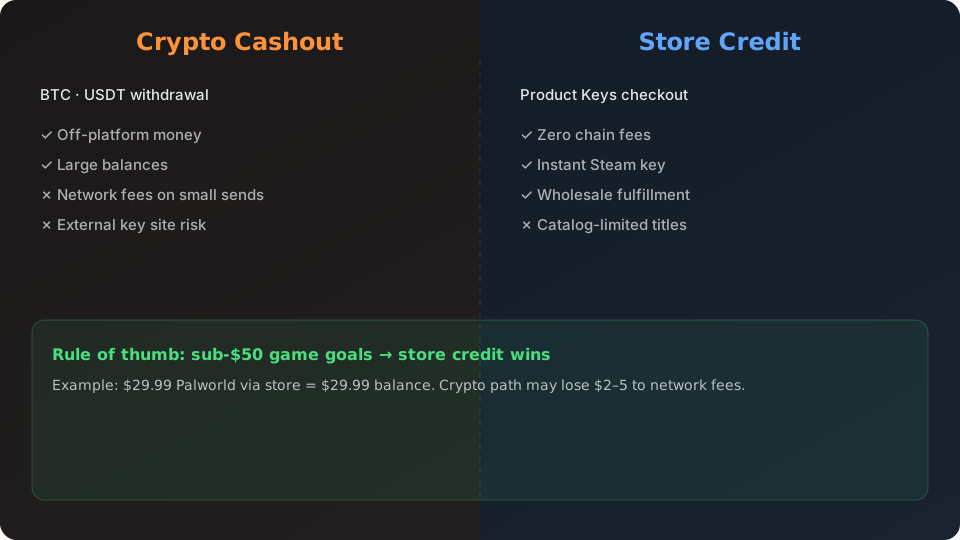
Crypto vs store credit: quick comparison
Store credit = instant spend on vetted game keys inside CashVers. Crypto = withdraw to your wallet, then buy anywhere — with network fees and timing risk.
| Factor | Store credit (Product Keys) | Crypto cashout |
|---|---|---|
| PayPal | N/A — not a CashVers rail | N/A — not a CashVers rail |
| Best for | Steam / PC backlog | Non-store purchases, savings |
| Typical friction | Low — no chain fees | Medium — gas/congestion |
| Small balances ($10–20) | Often optimal | Fees hurt net value |
| Speed to "value" | Minutes after balance clears | Minutes to hours (network) |
| Third-party key risk | None — wholesale fulfillment | Depends where you buy after |
CashVers Store
Fund your next game with earned balance
Skip sketchy key sites — browse authorized PC titles in the CashVers Product Keys store and pay with verified earnings.
Why is there no PayPal on CashVers?
CashVers focuses on crypto withdrawals and in-platform store spend — rails that scale internationally without PayPal region lockouts common on GPT sites. If PayPal is non-negotiable, platforms like Freecash may fit better for cash portions — see our comparison. Many CashVers users either spend balance on games or withdraw crypto to an exchange or wallet they already use.
When store credit beats crypto
Choose store credit when your goal is a PC game in the catalog, your balance is under ~$50, or external authorized sales do not beat in-platform pricing by enough to cover withdrawal fees.
- Target title is listed on Product Keys at acceptable price.
- Balance is cleared — not pending.
- Crypto network fees would eat >10% of a small withdrawal.
- You want zero exposure to gray-market key sites.
Walkthrough: Turn earnings into Steam keys.
When crypto cashout beats store credit
Withdraw crypto when you need money outside gaming, the game is absent from the store, or a verified external authorized sale saves more than fees + hassle.
- Console-only purchases not stocked in-platform.
- Large balances where flat fees are negligible.
- You already stack sats/USDT and prefer self-custody.
- Steam sale + authorized retailer beats store price by a wide margin — use the safety checklist externally.
Check live fee estimates in your dashboard the day you withdraw — congestion changes weekly.
Fee math example (July 2026)
Illustrative only — verify live numbers before acting.
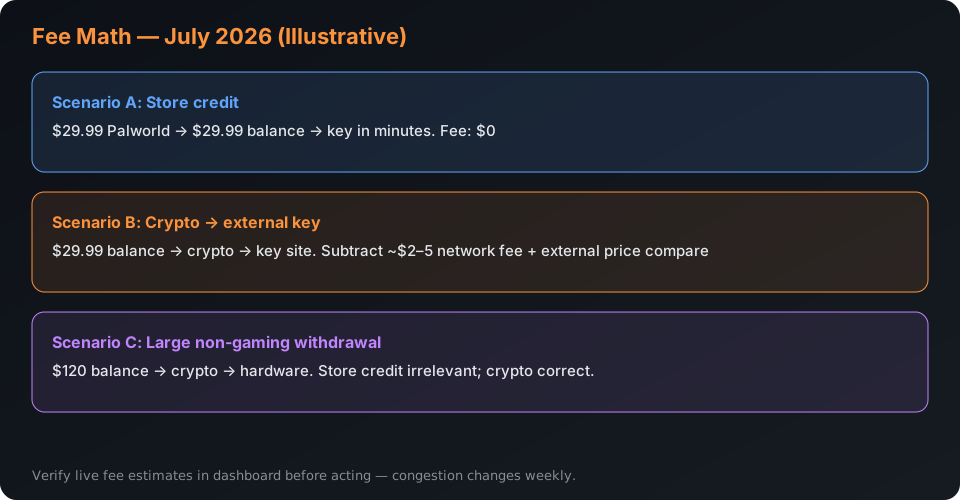
- Scenario A: $29.99 Palworld via store credit → $29.99 of earned balance, no chain fee, key in minutes.
- Scenario B: $29.99 balance → crypto → external key site. Subtract ~$2–5 network fee on small BTC send, then compare authorized key price. If external saves $3, you lost time for pennies.
- Scenario C: $120 balance → crypto → hardware purchase unrelated to games. Store credit irrelevant; crypto is correct.
Deep dive on balance-vs-external keys: Spending balance vs. cashing out.
Hybrid strategy: split balance
Serious earners often spend the game slice in-platform and withdraw the rest in crypto once fees amortize. Example: earn $80 in a month → $35 on a Summer Sale title in Product Keys → $45 USDT to wallet when network fees are low. No rule says all-or-nothing.
Tax and record-keeping (not advice)
GPT earnings may be taxable income in your jurisdiction — crypto withdrawals can create additional reporting events. Store credit spent on personal games is still income when earned; consult a tax professional for your country. Keep offer completion history and withdrawal receipts regardless of path.
Store credit vs gift cards on other GPT sites
Freecash-style gift cards are flexible but often carry markup and fixed denominations that do not match game prices. CashVers store credit maps directly to key listings — no $25 card for a $29.99 game problem. Trade-off: less flexibility outside the catalog.
BTC cashout deep dive: when it makes sense
Bitcoin withdrawals shine when your balance is large enough that flat network fees become a small percentage — typically $75+ cleared — and you already hold BTC in self-custody or on an exchange. During low-fee windows (often weekend mornings UTC), a $50 BTC send might cost $1.50. During congestion, the same send costs $6. Check live fee estimates in your CashVers dashboard the day you withdraw; never assume last week's number.
For sub-$30 balances, BTC often loses to store credit on a direct game purchase. Example: $22 cleared balance → Palworld at $29.99 requires more earning anyway, but a $9.99 indie title is buyable in-store with zero chain fee. Withdraw $22 BTC during congestion and you might net $16 — enough for nothing in the store and less than the game would have cost.
USDT and stablecoins: the small-balance sweet spot
When CashVers supports stablecoin rails on low-fee chains, USDT often beats BTC for earners who want off-platform money without volatility. You receive ~$1 for every $1 withdrawn (minus network fee), unlike BTC where a 3% daily swing can erase a survey's worth of earnings before you spend it. Stablecoins suit earners who transfer to an exchange, convert to local currency, or hold for the next Steam sale without timing Bitcoin's price.
Trade-off: you still pay gas or network fees. If the fee is $2 on a $15 withdrawal, that is a 13% haircut. Store credit on a $14.99 sale title may deliver more playable value.
How to evaluate the Product Keys catalog before earning
Before committing weeks of surveys, search the store for your target titles and note listing prices versus Steam. CashVers store pricing tracks wholesale rates — not always identical to Steam sales. During Steam Summer Sale (ended July 9, 2026), external authorized discounts sometimes beat in-platform listings by $3–5. During non-sale weeks, in-platform pricing often matches or beats hunting gray-market keys with less risk.
Workflow: add wishlist games to a spreadsheet with three columns — Steam price, store price, external authorized price. Update weekly. Spend balance when in-platform wins; cash out crypto when external sales plus fees still save meaningful money. Our key safety guide covers external buying when cashout is the right call.
Regional differences: why your friend's GPT stack differs
Offer inventory, survey pay rates, and withdrawal methods vary by country — a US earner's "best GPT site" list may not apply in the EU or Southeast Asia. PayPal availability, banking sign-up offers, and crypto regulation all shift the math. Compare platforms using your actual IP and payment methods, not a YouTube creator's US-centric tier list.
CashVers crypto rails often scale internationally where PayPal GPT cashouts face region lockouts. If PayPal is unavailable in your country, prioritize crypto + store spend paths over legacy survey sites still advertising PayPal in marketing copy but not in your dashboard.
Record-keeping for taxes and disputes
Export or screenshot offer completion history monthly — regardless of whether you spend in-store or withdraw crypto. GPT earnings may be taxable income in your jurisdiction. Store credit spent on personal games is still income when earned; crypto withdrawals may create additional reporting events depending on local law. This is not tax advice — consult a professional for your country.
For disputes: keep offer start screenshots, support ticket IDs, and withdrawal transaction hashes until credits fully clear. Platforms with ticket-based support resolve faster when you provide evidence upfront.
Decision tree: crypto, store, or hold?
Answer three questions the day your balance clears:
- Is my target game in the Product Keys catalog at an acceptable price today?
- If I withdraw crypto, what is the live network fee as a percentage of my balance?
- Is an authorized external sale (Steam, publisher store) beating in-platform price by more than fees plus hassle?
If question 1 is yes and question 3 is no → store credit. If question 1 is no and you need off-platform money → crypto when fees are acceptable. If question 3 saves $5+ net → cash out and buy externally using the safety checklist. When unsure → hold balance 48 hours; panic withdrawals on congested networks are the most common avoidable mistake.
Earners who treat GPT balance like a mini savings account — spend on games when catalog pricing wins, withdraw when crypto fees drop — consistently report less frustration than all-or-nothing withdrawers chasing every dollar off-platform.
CashVers Store
Ready to buy? Start in the store
Compare prices, check regions, and checkout with balance once your offers clear.
Frequently asked questions
Can I get PayPal from CashVers?
Not currently. Withdrawal options center on crypto; spending options center on the in-platform game-key store. Use Freecash or similar if PayPal is mandatory for your workflow.
USDT or BTC for small cashouts?
Depends on network conditions and your wallet. Stablecoins on low-fee chains often beat small BTC sends during congestion — check the dashboard for supported coins and live fee estimates.
Is Product Keys balance the same as "store credit"?
Yes in practice — verified earn balance spent on keys functions like store credit. It is not transferable Steam Wallet funds; you buy keys fulfilled through wholesale partners.
Are crypto withdrawals minimum higher than store purchases?
Often yes. Small balances that fail crypto minimums can still buy cheaper keys in-store — another reason store credit wins for micro earners.
Should I wait for Steam sales before spending balance?
Compare store pricing when your balance clears. External Steam sales sometimes beat in-platform listings; sometimes they align. Run the checklist in our key buyer guide before defaulting to cashout.
Can I use crypto and store credit in the same month?
Absolutely. Many users buy games in-platform and withdraw surplus earnings as crypto when fees make sense.
Should I withdraw crypto to an exchange or personal wallet?
Depends on your workflow. Exchanges simplify converting to local currency; self-custody wallets suit long-term holders. Factor transfer fees from the exchange when comparing net value versus store spend.
Can I buy Steam gift cards with crypto elsewhere instead?
Some authorized retailers sell Steam wallet codes for crypto — compare total cost (withdrawal fee + gift card price + Steam sale timing) against direct in-platform key purchase before assuming crypto is cheaper.
Reviewed by the CashVers storefront team. Last updated: July 2026.
Stop reading. Start earning.
This guide is only useful if you actually open the dashboard.


 Google
 Discord
 Steam
Steam