

The fastest way to turn CashVers earnings into Steam keys in 2026 is to complete verified offers on the Earn dashboard, wait for balance to clear, then buy directly from the Product Keys store — no gray-market checkout, no PayPal middle step, and no re-entering card details on unknown reseller sites. This guide walks through the full earn-to-library loop: first payout, balance math, region checks, and when spending in-platform beats cashing out to crypto.
"Every survey you finish is a vote for your next Steam game — if you spend balance before fees eat the withdrawal."
Most GPT guides stop at "cash out." Gamers care about the game in their library. CashVers is built for that second step: surveys and offerwalls fund balance you can withdraw as crypto or spend on Steam, Epic, and console keys through vetted wholesale partners. Below is the step-by-step path from zero balance to a redeemed key — plus the mistakes that waste weekends.
How do you turn CashVers earnings into Steam keys?
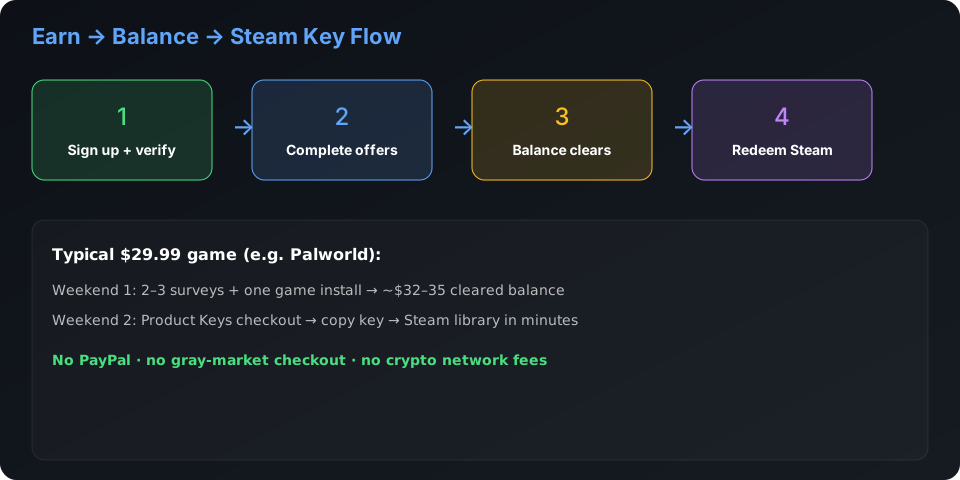
Sign up → complete offers on Earn → let credits post to balance → open Product Keys → pick your title → checkout with balance → redeem on Steam immediately. The whole loop stays inside CashVers after your first verified earnings. Typical timeline for a $30 game: one focused weekend if you follow the first-payout playbook, longer if you only do low-paying surveys.
- Create account and verify email (required before withdrawals or store purchases).
- Complete 2–3 high-trust offers: short surveys, app installs you actually finish, sign-ups you read first.
- Watch balance update — pending credits may take 24–72 hours depending on the wall.
- Search the store for your game; confirm platform (Steam) and region (Global vs. EU vs. US).
- Purchase with balance; copy the key; redeem on Steam within minutes.
- Keep order confirmation until Steam shows the title in your library.
CashVers Store
Turn earnings into Steam keys with earned balance
Skip sketchy key sites — browse authorized PC titles in the CashVers Product Keys store and pay with verified earnings.
Why buy Steam keys in-platform instead of cashing out?
In-platform purchases skip crypto network fees, avoid minimum withdrawal friction on small balances, and remove third-party key seller risk. A $25 Steam game funded by balance costs $25 of effort. Cash out $25 in BTC on a congested network and you might net less after fees — then still hunt external key sites. Our crypto vs. store credit guide runs the numbers; the short version: sub-$50 game goals often favor direct store spend.
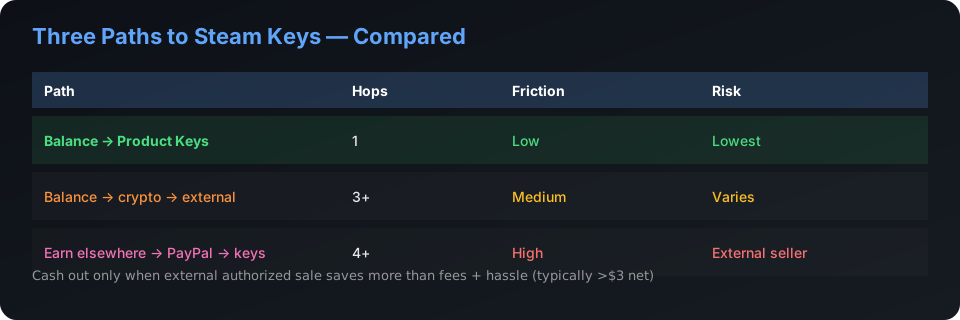
| Path | Best for | Friction |
|---|---|---|
| Balance → Product Keys | Steam backlog, sale hunting | Low — one ecosystem |
| Balance → crypto → buy elsewhere | Non-Steam platforms, HODL stackers | Medium — fees + external checkout |
| Earn elsewhere → PayPal → keys | Cash-first earners (see Freecash comparison) | High — three hops |
How much do you need before your first Steam key?
There is no magic threshold — you need enough cleared balance to cover the listing price plus any store rounding. July 2026 chart toppers like Palworld sit at $29.99; post–Steam Summer Sale deals on Elden Ring Nightreign or Clair Obscur: Expedition 33 may land lower on external sales but store pricing tracks wholesale rates. Start with a $5–10 indie title as a test purchase if you are nervous about region locks — same workflow, lower stakes.
Power earners stack:
- Morning survey block (desktop, stable IP, no VPN).
- One game-offer install you intend to play for the required minutes.
- Evening check-in on pending credits before starting new walls.
Read offer cards like contracts. Screenshot start pages. Support tickets with proof beat chargebacks every time.
What happens at Product Keys checkout?
You select a title, confirm platform and region on the listing, pay with verified balance, and receive a key for immediate redemption. Keys are fulfilled through established wholesale channels — not random user-to-user marketplace listings. That is the safety difference versus hunting 80% off on unknown sites during a chart-topping launch week.
Before you click buy:
- Match region to your Steam account country.
- Confirm edition (Standard vs. Deluxe) if DLC matters.
- Compare store price to Steam's current sale — sometimes external authorized sales win; we say so in our key safety guide.
Example: funding Palworld or a Summer Sale pick
Target a $29.99 title → earn ~$32–35 cleared balance to absorb pending-offer variance → buy in-store → redeem same day. Palworld 1.0 dominated July 2026 Steam charts; earners who skipped external resellers during the hype cycle avoided scam listings advertising impossible discounts. For post-sale catalog picks (Nightreign at 25% off, Expedition 33 at 20% off during the June–July Steam event), compare store pricing the day you hit balance — sales do not always align across channels.
When should you cash out instead of buying keys?
Cash out to crypto when you need funds outside gaming, your target title is not in the store, or an authorized external sale beats in-platform pricing by a margin worth the fee. Run this checklist:
- Write the game + current Steam price + store price.
- Estimate crypto withdrawal fee at your balance size.
- Subtract fee from external savings.
- If net savings < $3, buy in-platform and save the hour.
Five mistakes that delay your first Steam key
- VPN during tracked offers — walls flag it; credits never post.
- Buying before balance clears — pending is not spendable.
- Ignoring region tags — Global vs. EU mismatches fail at redeem.
- Chasing impossible external deals — chart-topping games attract scam sites.
- Cashing out micro amounts — fees eat the withdrawal; spend on a cheap key instead.
Which offer types fund Steam keys fastest?
Not all CashVers offers credit equally — surveys, game installs, and sign-ups have different pending times, completion rates, and effective hourly yields. July 2026 data from active earners (anecdotal, not guaranteed) suggests this priority order for Steam-focused goals:
- Short surveys ($1–3, 5–12 minutes) — Reliable credits, low dispute risk. Stack 4–6 per session on desktop with stable Wi‑Fi.
- Game installs with clear level targets ($5–25) — Highest per-hour potential if you finish requirements in one sitting. Read level and time limits before starting.
- Banking or subscription sign-ups ($20–80) — High payout but only if you genuinely want the product. Never sign up for services you plan to cancel immediately — that violates terms and triggers chargebacks.
- Video watches and passive tasks ($0.10–0.50) — OK filler during downloads; poor primary strategy for funding $30+ titles.
Start each session on Earn by sorting available offers by payout, not by "recommended." Screenshot the offer card before clicking through.
Understanding pending vs. cleared balance
Pending credits are not spendable — only cleared balance works at Product Keys checkout. Offerwalls hold credits pending for 24 hours to 14 days depending on campaign type and advertiser verification. Game installs often pend longest; surveys sometimes credit within hours.
Before starting a store purchase, confirm your dashboard shows cleared (available) balance, not just pending totals. Nothing wastes momentum like hitting checkout and discovering $28 pending and $4 cleared when Palworld costs $29.99.
If pending credits stall past the stated window, open a support ticket with your offer start screenshot. Do not start duplicate offers on another wall while waiting — that violates terms and complicates attribution.
Streaks, tiers, and multipliers: stacking value
CashVers tier and streak systems reward daily consistency — a 15-minute daily habit often out-earns one exhausting Saturday. Check your dashboard for active multipliers before choosing offers. A $3 survey at 1.2× tier bonus beats a $3.50 survey with no multiplier. Streak breaks reset progress — set a phone reminder if you are pushing for a Gold-tier weekend.
Tiers matter most when you are $5–10 short of a store purchase. One boosted week can close the gap without new offer types.
Using CashVers alongside Freecash (without double-dipping)
Many Steam-focused earners use CashVers for store spend and Freecash for PayPal-heavy offers — never completing the same tracked campaign on both platforms. Example split: complete a high-payout banking offer on Freecash (cash to wallet), run surveys on CashVers (balance for keys). Read each offer's terms — some explicitly prohibit multi-platform completion.
Full comparison: CashVers vs Freecash. GPT site selection framework: best GPT sites checklist.
2026 sale calendar: when to hold balance vs. buy
Major Steam events (Summer, Autumn, Winter) often shift optimal buy timing — compare store and Steam prices the week your balance clears, not the week you started earning. Post–Summer Sale 2026, many chart-toppers hold smaller discounts until the next event. Backlog earners targeting older AAA titles may find stable in-platform pricing without waiting for seasonal dips.
Palworld 1.0's July 2026 chart surge reminded earners that hype cycles attract scam key listings — in-platform purchase avoids that noise entirely during launch windows.
CashVers Store
Ready to buy? Start in the store
Compare prices, check regions, and checkout with balance once your offers clear.
Frequently asked questions
How long does it take to earn enough for a Steam game?
Depends on offer mix and region. Focused earners often reach a first $20–30 balance within a weekend using surveys plus one game install. Pending times vary by wall — plan 24–72 hours for credits to clear before purchasing.
Does CashVers add games directly to my Steam library?
You receive a Steam key to redeem on your account — the standard PC digital purchase flow. Redeem immediately after purchase and keep confirmation until the title appears in your library.
What if the key is region-locked?
Read the listing before checkout. Choose Global or a region matching your Steam account country. Our key safety checklist covers region tags in detail.
Is this easier than earning on Freecash and buying keys elsewhere?
For Steam-focused earners, yes — one dashboard for earn and spend. See CashVers vs Freecash if you split time across platforms.
Can I still cash out to crypto after earning?
Yes. Store spend and crypto withdrawal both use verified balance. Many earners buy one game in-platform and cash out the rest — compare fees in our payout comparison.
Is buying keys with earned balance safe?
Spending inside CashVers avoids third-party marketplace roulette. Fulfillment runs through vetted wholesale partners; you still verify region and edition like any digital purchase.
Can I refund a key bought with CashVers balance?
Refund policies follow platform terms and key redemption status — unredeemed keys may qualify within the stated window. Redeem only when you are ready to keep the title, same as any digital key purchase.
Can I buy multiple games in one checkout session?
Yes, if cleared balance covers the cart total. Some earners fund one backlog title per month to keep goals tangible — others stack indies until balance runs out. Both work; pending credit timing is the usual bottleneck.
Reviewed by the CashVers earnings team. Last updated: July 2026.
Stop reading. Start earning.
This guide is only useful if you actually open the dashboard.


 Google
 Discord
 Steam
Steam