

Schedule I refuses to leave Steam's July 2026 conversation — months after TVGS's breakout launch, the co-op drug-dealer sim still sits in the paid top-seller band thanks to creator clips, friend-group chaos, and steady patch cadence. If you only know the meme trailers, July is when chart data and player reviews tell a clearer story: this is not a one-week TikTok spike. It is a sandbox with repeatable co-op goals, risky economics, and enough systems depth that groups keep scheduling "one more run." Below we break down why Schedule I still charts, who should buy, how to get keys safely, and how to fund a copy from earned GPT balance instead of impulse-charging a card.
"Games that stay in Steam's revenue conversation without a $70 marketing machine usually win on co-op stickiness — Schedule I is the textbook case in 2026."
July 2026's Steam leaderboard is crowded: Palworld 1.0 reclaimed #1, remakes like Assassin's Creed Black Flag: Resynced pulled nostalgia buyers, and RPG holdovers keep selling. Schedule I punches above its weight because it is cheap to try, brutal to master, and perfect for streamable co-op. Here is the chart context, gameplay reality check, and purchase plan.
Why is Schedule I still on Steam charts in July 2026?
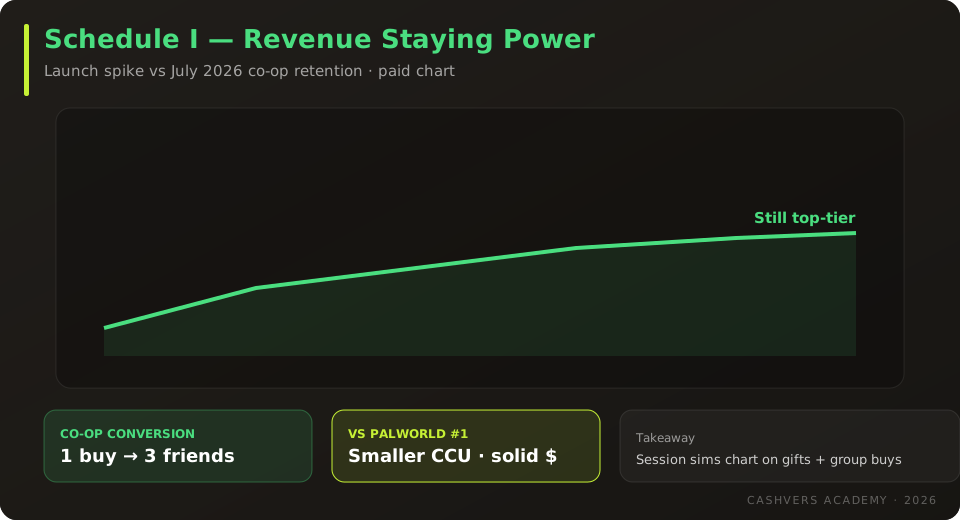
Schedule I remains a top paid seller because co-op sessions convert viewers into buyers faster than solo story games — and TVGS keeps shipping fixes that reduce early friction. Steam's weekly revenue ranking (excluding free-to-play) still places Schedule I in the upper tier for the week ending July 21, 2026, alongside Palworld and several July remasters. Concurrent player counts are smaller than Palworld's million-player weekends, but revenue-per-copy and gift purchases keep the title visible.
Four drivers explain the longevity:
- Co-op funnel — One friend buys, three friends join the same server within 48 hours. Discord groups treat it like a digital board game night.
- Creator-friendly loops — Police raids, botched deals, and physics glitches produce clips that outperform polished AAA trailers on short-form video.
- Accessible price band — Steam MSRP sits in the indie sweet spot (typically mid-$20s), so the "try it with the squad" objection is low.
- Repeatable sessions — Unlike a 15-hour campaign, economic sims reward multiple evenings — chart stamina follows playtime, not just launch hype.
CashVers Store
Grab Schedule I for co-op night
Fund a global Steam CD key from earned balance — skip account-sharing listings and unknown resellers.
What is Schedule I actually about?
Schedule I is a first-person co-op crime sim where you grow, process, and sell product while managing heat, suppliers, and base upgrades — closer to a chaotic tycoon game than a narrative shooter. Missions escalate from small street deals to risky logistics. Police pressure, rival gangs, and bad math wipe profits fast. The fantasy is entrepreneurial danger, not power fantasy heroics.
If you expect GTA Online polish, adjust expectations. Schedule I leans into jank-as-feature: physics mishaps become stories. Groups that communicate ("you watch the door, I bag the cash") outperform solo players who treat it like a walking simulator.
Is Schedule I worth buying in July 2026?
Buy Schedule I now if your friend group wants a repeatable co-op sandbox with economic tension; wait if you need strong solo narrative or hate systems-heavy grinds.
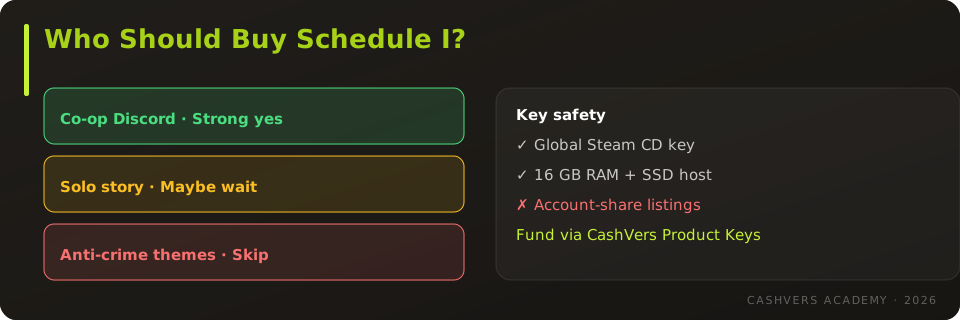
| Player profile | Verdict | Why |
|---|---|---|
| Co-op Discord group | Strong yes | Designed for shared chaos and clip-worthy moments |
| Streamer / clip hunter | Yes | High emergent content density per hour |
| Solo story gamer | Maybe wait | Co-op is the main event; solo can feel grindy |
| Anti-crime themes | Skip | Subject matter is the entire premise |
| Needs AAA polish | Maybe wait | Indie scope; patches help but jank remains |
Schedule I vs Palworld 1.0 — which July chart game first?
Pick Palworld for creature-collecting survival at scale; pick Schedule I for shorter, sharper co-op sessions with real-time voice coordination. Palworld demands calendar time — base builds, breeding, raids. Schedule I fits a three-hour Friday night. Budget-limited buyers should align with whichever loop their group already plays: open-world sandbox vs session-based sim.
Many groups own both: Palworld for the long arc, Schedule I for weekly drop-in chaos. If you can only fund one title this month from GPT earnings, read our July chart funding guide for hour-to-dollar targets.
What PC specs do you need for Schedule I?
Schedule I targets mid-range gaming PCs: a GTX 1060 / RX 580 class GPU, 16 GB RAM, and an SSD for stable streaming in dense neighborhoods. Host machines in co-op need stronger CPUs than clients — physics and AI spikes land on the host. Laptops with integrated graphics may run low settings at 720p; verify Steam Deck compatibility notes before portable play.
Network stability matters more than raw FPS. Packet loss during a police chase ends runs faster than a frame drop. Wired Ethernet on the host is the cheapest upgrade.
How do you buy Schedule I Steam keys safely?
During chart heat, scam listings multiply — stick to Steam or authorized retailers with clear region tags and refund policies. Schedule I listings often include EU-only, global, and account-based SKUs. Account shares look cheap; they carry ban and recovery risk. Prefer standard Steam CD keys you redeem on your own account.
- Match key region to your Steam account country.
- Reject prices that imply 70%+ off while the game still charts — investigate the seller.
- Redeem immediately; do not stockpile unused keys.
- Keep invoice screenshots until the title appears in your library.
Full framework: How to buy cheap game keys safely in 2026.
Can you fund Schedule I with CashVers earned balance?
Yes — complete offers on CashVers, let balance clear, then checkout a Schedule I Steam key in the Product Keys store without gray-market checkout. For a mid-$20s title, a focused weekend of surveys and install offers often clears enough balance when you follow the first-payout playbook. Compare that path to crypto cashout in crypto vs store credit before you withdraw small amounts eaten by fees.
Co-op tips that keep groups from quitting early
Assign roles (scout, driver, accountant), cap session length at 90 minutes, and bank profits before risky expansions — most early quits come from one catastrophic raid, not boredom. Use voice chat for police callouts. Upgrade security before vanity cosmetics. Treat losses as content, not failure — the clip economy rewards disasters as much as wins.
Should streamers cover Schedule I in July 2026?
Yes — if your audience tolerates mature themes, Schedule I still delivers clip density per hour that rivals newer horror co-op launches without requiring PvP skill. Label streams appropriately, disable risky music, and set expectations that raids can end runs abruptly — that tension is the content. Sponsored key drops should still use authorized sellers; viewers copy your checkout path.
Co-streaming works best with fixed roles announced on overlay so chat understands the econ loop. Palworld streams skew longer and slower; Schedule I fits variety segments between RPG playthroughs.
Does Schedule I support mods or private servers?
Check current Steam workshop and patch notes before planning modded co-op — indie sims often add mod tools after chart stability. Private servers can reduce public chaos but require host maintenance. For most July buyers, vanilla co-op is the intended experience; mods are bonus, not requirement.
Family and shared-PC considerations
Schedule I is not a household default on shared family PCs — store purchase history and Steam Family settings should hide mature titles from younger profiles. If you earn keys via CashVers on a shared account, redeem on an adult profile with PIN protection enabled.
What updates should buyers watch after July 2026?
TVGS has incentive to keep patching while charts stay warm — expect QoL for inventory, co-op sync, and anti-grief tools rather than a full genre pivot. Competing July launches (Palworld 1.0, remasters, RPG holdovers) will steal headlines in Q3. Schedule I wins by retaining friend groups, not by winning Metacritic arms races.
July 2026 Steam refund policies still apply — if co-op fails on your hardware within two hours, Steam may refund; external key stores vary. Test performance with friends in the refund window before grinding late-game econ.
CashVers Store
Ready for co-op chaos?
Pair this guide with a verified key — then share earn-to-Steam workflow with friends who need balance.
Frequently asked questions
Is Schedule I still a Steam top seller in July 2026?
Yes — it continues to rank in the upper paid revenue tier alongside larger launches, driven by co-op purchases and sustained player return rather than a single launch spike.
Is Schedule I co-op only?
Solo is supported, but the design assumes voice-coordinated groups. Most positive long-term reviews come from co-op parties.
Is Schedule I appropriate for all audiences?
No. Drug trade themes, violence, and mature humor earn its rating. Verify Steam age gates before gifting to minors.
Should I buy a Steam account listing instead of a CD key?
Generally no. Account shares violate platform trust expectations and are harder to recover if access is revoked. Prefer redeemable keys on your own account.
Schedule I or Palworld for a group of four?
Palworld if you want months of base-building; Schedule I if you want loud, session-based chaos. Budget for both only if your group finishes games slowly.
How much do I need to earn on CashVers for Schedule I?
Target roughly the Steam price plus a small buffer for tax or store rounding — often mid-$20s USD equivalent. See the July funding guide for worked examples.
Can I refund Schedule I on Steam?
Steam's standard two-hour / fourteen-day window applies if you bought directly on Steam. Third-party keys follow that seller's policy — another reason to prefer vetted catalog checkout with documented support.
Reviewed by the CashVers gaming editorial desk. Last updated: July 2026.
Stop reading. Start earning.
This guide is only useful if you actually open the dashboard.


 Google
 Discord
 Steam
Steam