

The best apps that pay you to play games in 2026 are not the ones screaming "$500 instant" in mobile ads — they are established GPT platforms and reward apps with transparent payout rules, offerwall tracking, and realistic per-hour yields. CashVers leads for gamers who want Steam keys from earned balance; Freecash and mobile reward apps fit cash-first grinders. This tier list ranks what actually credits, what pays, and what to avoid.
"If the app promises a car for three levels of Candy Crush, you are the product — not the winner."
July 2026's earn-to-play landscape splits into three buckets: desktop GPT aggregators (surveys + game offers), mobile play-to-earn reward apps, and hybrid platforms with integrated stores. We rank on payout reliability, game-offer depth, withdrawal flexibility, and — for PC gamers — whether you can fund Steam without reseller roulette.
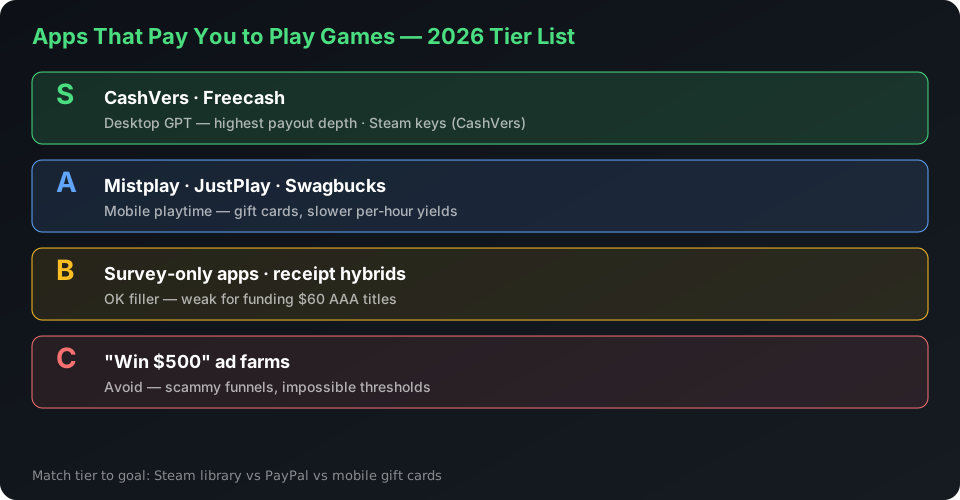
2026 tier list: apps that pay you to play games
S-tier platforms credit consistently and match a clear payout goal; C-tier apps waste time or hide impossible thresholds. Treat ranges as directional — promos and regions shift weekly.
| Tier | Platform | Best for | Game-key path? |
|---|---|---|---|
| S | CashVers | PC gamers → Steam keys + crypto | Yes — in-platform store |
| S | Freecash | Max offer volume, PayPal/cash | No — cash out, buy elsewhere |
| A | Swagbucks / InboxDollars | Casual surveys + light game offers | Gift cards only |
| A | Mistplay (Android) | Mobile game discovery rewards | Gift cards, not Steam direct |
| B | JustPlay / similar | Passive mobile playtime coins | PayPal at high thresholds |
| B | Benjamin / reward aggregators | Receipt + offer hybrids | Varies by region |
| C | "Win $500" ad farms | Nobody — scammy funnels | No — avoid |
CashVers Store
Fund your next game with earned balance
Skip sketchy key sites — browse authorized PC titles in the CashVers Product Keys store and pay with verified earnings.
Why CashVers is S-tier for PC gamers
CashVers combines multiple offerwalls with crypto cashouts and a native game-key store — the only S-tier pick that closes the earn-to-Steam loop without external key sites. Game offers on desktop walls often pay more than passive mobile playtime apps. Surveys fill gaps between installs. Completed earnings become balance you spend at Product Keys or withdraw as BTC/USDT.
Start here if your end goal sounds like: "I want Palworld / Nightreign / sale backlog titles funded by surveys." Read how to turn earnings into Steam keys for the step-by-step path.
Why Freecash stays S-tier for cash hunters
Freecash wins on offer surface area and familiar withdrawal rails — PayPal, crypto, gift cards depending on region — but not on integrated game purchases. Power users chase high-payout game installs and banking sign-ups. You cash out, then buy Steam credit or keys separately — extra friction, but strong if you want dollars in hand. Compare both in CashVers vs Freecash.
Mobile reward apps: A-tier with caveats
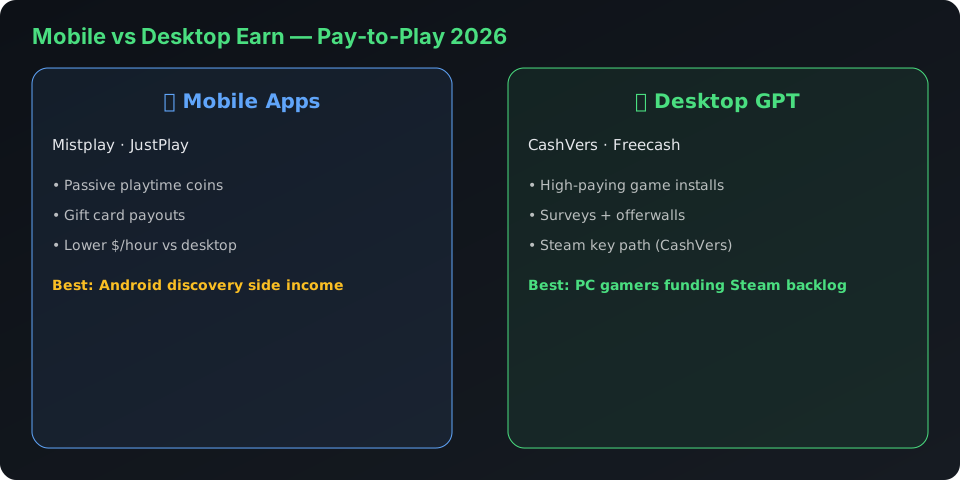
Mistplay and peers pay gift cards for mobile game minutes — legitimate for Android discovery, weak for funding $60 PC AAA titles quickly. Payout per hour is lower than targeted desktop game offers on GPT walls. JustPlay-style passive apps require long playtime before PayPal thresholds feel real. Use mobile apps as side income, not your primary Steam strategy.
Red flags shared by bad "play to earn" apps
- Impossible headline rewards ($500 for one level).
- Withdrawal requires inviting 50 friends.
- No ticket-based support or terms of service.
- Store reviews that are all generic five-star text.
- Requests for account passwords or payment card photos.
Legitimate platforms pay modest amounts for real ad-attributed actions — not lottery jackpots.
How to maximize game-offer payouts on GPT platforms
Read requirements, play on the registered device, hit level milestones before uninstalling, and never use VPNs during tracked sessions. Tips that work on CashVers and Freecash alike:
- Screenshot the offer start page with timestamp.
- Install from the wall link — not from the App Store search bar.
- Complete tutorial and required level in one sitting when possible.
- Wait for pending period to end before deleting the game.
- Open support with proof if credit fails — do not chargeback your bank.
PC vs mobile: where should gamers earn?
Fund Steam libraries on desktop GPT platforms; use mobile apps for gift-card side cash or commutes. PC game trials, subscription sign-ups, and higher-paying surveys cluster on web dashboards like CashVers Earn. Mobile excels at low-attention playtime but rarely beats a good desktop game install payout.
July 2026 context: why earners are active now
Post–Steam Summer Sale (ended July 9, 2026) and Palworld 1.0's chart comeback keep PC gamers hunting value — earn-to-play fills the gap between wallet and wishlist. Nightreign and Expedition 33 saw modest sale discounts; backlog earners target those price points with balance instead of impulse credit-card buys. Hot release cycles reward platforms that let you spend without leaving the ecosystem.
Where to start this week
Pick one S-tier platform, run a 48-hour test, measure what credits. Gamers → CashVers + first payout guide. Cash-first → Freecash + small PayPal test. Never split attention across four apps on day one.
Surveys vs. game offers: which pays gamers more?
Desktop game offers on GPT walls typically beat passive mobile playtime apps on effective hourly rate — but surveys win on consistency and lower dispute risk. A typical July 2026 mix for Steam-focused earners: 60% surveys, 30% game installs, 10% high-trust sign-ups. Mobile-only earners on Mistplay often see $1–3/hour equivalent; a well-chosen desktop game install can exceed $8/hour if requirements match your play style.
Match offer type to context: surveys on lunch breaks, game installs on evenings when you can finish level targets uninterrupted, sign-ups only when you want the product anyway.
Side-by-side: CashVers vs Freecash vs Mistplay for gamers
| Feature | CashVers | Freecash | Mistplay |
|---|---|---|---|
| Primary device | Desktop + mobile web | Desktop + mobile web | Android only |
| Steam key path | Direct in store | Cash out → buy elsewhere | Gift cards only |
| Typical game offer payout | $5–40 per install | $5–50 per install | Points → gift cards |
| PayPal | No | Yes (region-dependent) | No |
| Best for | PC library funding | Cash-first grinders | Mobile discovery |
Sample 7-day routine for a $30 Steam game
Goal: $32 cleared balance (buffer above $29.99 listing) within one week using CashVers as primary platform.
- Day 1: Account setup, profile completion, 3 short surveys ($4–6 pending).
- Day 2: 4 surveys + daily bonus ($5–8 pending).
- Day 3: Start one game install offer; play to required level ($8–15 pending).
- Day 4: Surveys only; check Day 1 credits clearing ($4–6).
- Day 5: Finish game requirements if needed; 2 surveys.
- Day 6: Review pending vs cleared; support ticket any stalled credits.
- Day 7: Purchase in Product Keys when cleared balance covers target.
Timelines slip if offers pend longer than expected — always earn a $3–5 buffer above list price.
Teens, parental controls, and age-gated offers
Many game offers and surveys require 18+; parental consent platforms exist but change available inventory. Read age requirements on each offer card. GPT platforms generally prohibit multiple accounts per household — one account per person, honest demographics.
2026 trends: what changed in pay-to-play apps
Attribution got stricter, fake "win $500" ad farms multiplied, and desktop GPT platforms added store spend paths that mobile gift-card apps cannot match. Apple and Google policy shifts reduced some passive playtime rewards; advertisers now demand provable level completion and longer retention windows on game offers. That hurts low-effort farms but helps legitimate platforms that explain requirements upfront.
PC gamers increasingly expect earn-to-Steam workflows — not another $10 Amazon gift card that does not cover a $59.99 launch title. Platforms without a game purchase path feel incomplete in 2026's market. Read the full GPT comparison framework at best GPT sites in 2026 before picking your primary app.
When testing a new app, track effective hourly rate for your first ten completed tasks — if you consistently land under $2/hour after pending clears, switch offer types or platforms rather than grinding harder on low-yield categories.
Document your results in a simple spreadsheet: date, platform, offer type, minutes spent, payout pending, payout cleared. After two weeks you will know your personal S-tier stack — data beats YouTube tier lists.
Revisit the tier list quarterly — offer inventory and payout thresholds shift with advertiser budgets. A platform that was B-tier in March can move to A-tier after a wall upgrade; stale rankings waste time and leave money on the table.
CashVers Store
Ready to buy? Start in the store
Compare prices, check regions, and checkout with balance once your offers clear.
Frequently asked questions
Do apps that pay you to play games actually work?
Yes — established GPT and reward apps pay when offers credit under their rules. Yields are side-income realistic ($5–50/week for casual users), not full-time wages. Scam apps exist; stick to S/A-tier names with community history.
What is the best app to earn Steam games?
CashVers — because earned balance buys Steam keys in-platform. Freecash works if you cash out and buy separately. Mobile apps pay gift cards, not direct Steam keys.
Mistplay vs CashVers for gamers?
Mistplay rewards Android mobile playtime with gift cards. CashVers targets PC gamers with desktop offers, crypto, and a game-key store. Different devices, different goals.
How many hours to earn a $30 game?
Varies wildly. A strong weekend of surveys plus one high-paying game install on CashVers can approach $30 cleared; passive mobile apps take longer. Plan for pending credit delays.
Is getting paid to play games legal?
Yes in most regions — you are compensated for ad-attributed actions or survey responses. Read each platform's terms; do not use bots, VPN fraud, or duplicate accounts.
Can I use multiple apps at once?
Yes, but never complete the same tracked offer twice across walls. Many earners use CashVers for Steam goals and Freecash for cash offers when terms allow.
How does Swagbucks compare for gamers?
Swagbucks offers brand trust and gift cards but weaker game-offer depth and no direct Steam key path. Fine as a secondary channel; not ideal as your only Steam funding source.
Are passive play apps like JustPlay worth it?
As side income during commutes — maybe. For funding $30+ PC titles — rarely. Desktop GPT game offers pay more per hour when you finish level requirements.
Reviewed by the CashVers gaming editorial desk. Last updated: July 2026.
Stop reading. Start earning.
This guide is only useful if you actually open the dashboard.


 Google
 Discord
 Steam
Steam